Backyards and decks – what the bylaws say

Preamble:  Back yards and gardens had no structures in 1979. No decks, no patios. Just grass. Some members chose to build wood decks (with permission) and some put patio stones. Some did nothing. Any backyard construction and planting was done at the members’ own cost. The co-op looks for safety issues.

Summary of the bylaws about backyards and decks:

In the bylaws, yards are described as exterior private areas. (Maintenance Bylaw, Article 4).

Members are responsible for reasonable maintenance of their yards. (Maintenance Bylaw, Article 4.)

Members will be individually responsible for the cost of improvements or alterations to their units. (Maintenance Bylaw, Article 6 (a))

Decks are on the list of “previously approved renovations” by members.
(Maintenance Renovation Bylaw, A 10)

Decks may be installed, with approval (and restrictions).

ii) If at move-out time staff deems a deck to be unsafe or ill-built, the out­going member may be required to remove it.

iii) Patio stones or similar surfaces may be laid without approval.
(Maintenance Renovation Bylaw, Article 4)
Exception: Wilton Street patios (Article 4 d)

Maintenance Bylaw

4. Exterior Private Areas

(a) Yards

i) Members are responsible for reasonable maintenance of their yards.

ii) Members may not keep livestock in yards or allow refuse to accumulate in yards.

iii) Back gates must remain accessible to allow for entry by utility meter readers.

(b) Fences

i) Painting and staining of fences, gates, and outside wooden steps may be done only by the Co-op in order to maintain a uniform appearance. The cost will be borne by the Co-op.

ii) The Co-op will repair damaged fences. A fee will be charged if damaged by neglect or abuse.

6. Improvements By Members

(a) Members will be individually responsible for the cost of improvements or alterations to their units.

Maintenance Renovation Bylaw

General A 10.

The Co-op shall maintain a list of previously approved renovations, with plans where possible, so that members may duplicate alterations others had made. Members will be encouraged to report back to the Co-op their experience with renovations ­– e.g. what worked, what problems they encountered, etc., so that others may profit from their experience.

Previously Approved Renovations

– installation of dishwashers in townhouses

– removal of front hall cupboard in Albert Franck Units

– changes to cupboard under stairs in Albert Franck Units

– cutting pass-throughs in wall between kitchen and living/dining room

– renovation of basement space

– decks

4. Exterior Areas 

(c) Backyards

i) Decks may be installed, with approval, provided they do not involve any changes to the present deck structures (e.g. removal of railings, moving the steps, etc.) and providing the member does not intend to sink the supports in cement in the ground.

Decks may not be attached to the building, but may be attached to fences.

ii) If at move-out time staff deems a deck to be unsafe or ill-built, the out­going member may be required to remove it.

iii) Patio stones or similar surfaces may be laid without approval. [Rationale: The grass in the backyards rarely grows properly since the soil is so poor. It is not difficult or expensive to return to grass if the incoming member wishes to do so.]

iv) Trees may not be planted, removed or pruned, without permission from the Co-op.

(d) Wilton St. Patios

i) Patio stones may not be replaced or painted by members.

ii) Any structure which will protrude above the fence must be approved by the Co-op.

iii) Nothing may be mounted to the top of the medium rise patio wall.

Members on the ground floor of the medium rise are reminded that the lockstone surface of their rebuilt patios should not be disturbed.

Soil or plants should not be placed directly on the surface – self-contained planters must be used instead. Nothing should be placed over the drains.

It is important to avoid any activity that might damage layers below the lockstone – keeping this surface sealed is the whole point of the very expensive Podium Deck project.

Condition of a unit:

(A) Source: Move-Out Bylaw, Preamble

The purpose of this policy is to clarify the Co-op’s expectations about move-out condition of units.

It is recognized that the buildings are getting older, and members will not be penalized for normal wear and tear.

Conversely, the Co-op will make every effort to ensure that units are in reasonably acceptable condition when members move in, but will not guarantee an “as new” condition.

(B) Source: Move-Out Bylaw, Article 7.2

The Co-op cannot restore a unit to its original condition, nor guarantee that a relocating member’s new unit will be in the same condition as the unit they are vacating.

Member forum on the On-Call amendment to the Occupancy Bylaw

The Bylaw Committee will be hosting a forum for members to discuss the update to the Occupancy Bylaw, Article 17.4 Co-op Employees.

The member forum will be held in the Penthouse on Wednesday September 2, at 7pm.

The Board of Directors is recommending changes that will allow Woodsworth to maintain an in-house on-call service that employs our residents while helping to keep costs down.

If the bylaw amendment is approved, co-op members will continue to be hired as on-call workers for Woodsworth. The key change is that On-Call workers would be co-op employees, not paid volunteers in a co-op committee.

The bylaw amendment will be brought to the membership at a general members’ meeting (GMM) and must be approved by a ⅔ majority of votes cast.

The proposed amendment is on the co-op website – https://www.woodsworthcoop.ca/index.php/occupancy-bylaw-revision-proposed/

Feedback is also welcome by email – feedback@woodsworthcoop.ca

Maintenance work orders

July 31, 2026

The online portal is not working:

Please submit paper work orders only until the system is up again.

If you have an outstanding digital Work Orders, please resubmit a paper copy  until worthier notice.

Please put Work Orders in the locked box found on the Maintenance Room door in the parking garage.


Use the NewViews Maintenance Tool to submit a request to report maintenance problems and request repairs.


Click to log in
You can bookmark the maintenance portal on your device to access it faster next time. https://wo.newviews.com/woodsworth

The link should already include our name Woodsworth.  If not, you’ll see a prompt—just type woodsworth and continue to log in.

1. Username and password

First time users – your username and password are identical.
Initially, your username and password are the same – both should be lowercase. 
You can change your password for future logins.
On the login screen, enter your username and password in the following format: door numberDASHsurname
Your surname should be in lower case, not capitalized.

This is the default for both username and password.

Here are examples of how members on different floors or streets should log in:

Mid-rise units – units in 133 Wilton Street
Barbara Lee in unit #102 would enter 102w-lee

Members in street access units (townhouses and Wilton Street
So if Barbara Lee lived in a street-access unit or Wilton Street, she would write it like this:

  • Albert Franck units: 48af-lee
  • Frederick Street: 96f-lee
  • George Street:  12g-lee
  • Wilton Street: 234w-lee
    (Note: mid-rise and Wilton Street have the same format.)

Reminder: The default password is the same as your username.
Your username does not change after changing your password. (See #4).

Username: Any problems with your username, contact the Management Team at Woodsworth.

Password: If you are prompted to change your password, you can do it now or do it later. More information below.

2. Creating Work Orders

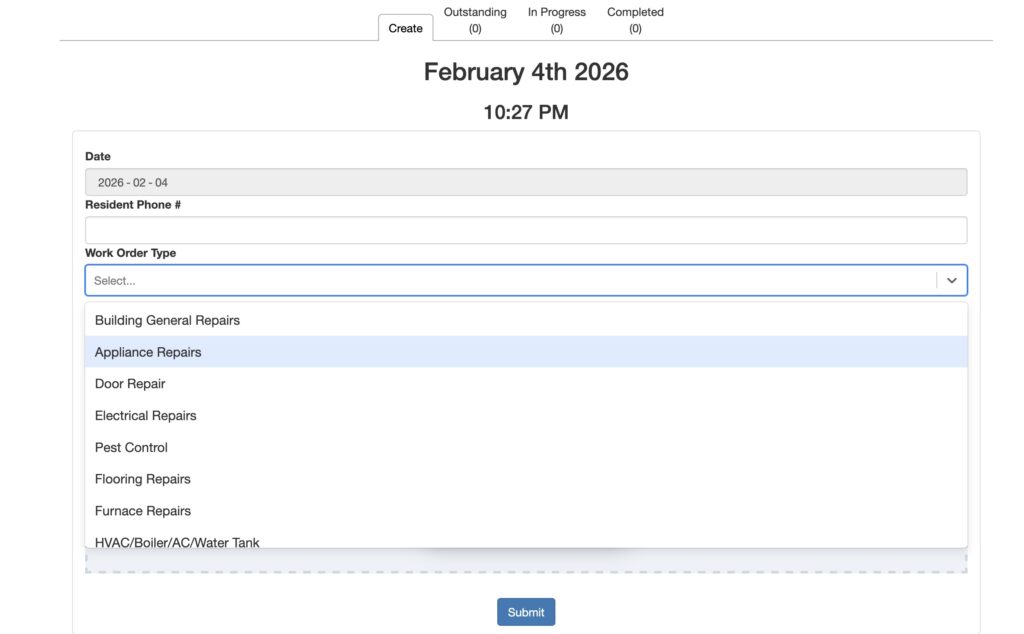
After logging in with your username and password, you can create a work order by completing the form in the Create Work Order tab:

– Enter your phone number
– Select a Work Order Type that best describes your problem.
– Provide details of work to be done.
– Give permission to enter your unit
– Attach any photos (optional)
– Click on the blue Submit button when you are finished filling in the form.


Click on the blue Submit button when you are finished filling in the form.

3. Tracking work orders for your unit

You can view all your unit outstanding work orders on the other tabs -Outstanding, In Progress and Completed.

And see the attached instructions sheet.

The web link to the Maintenance Module can also be found at the bottom of emails sent by the office.

4. Updating your password

Initially, your Username and Password are the same and both should be lowercase.

Click on the orange padlock icon beside your Username. (As usual, save your new password!)

You cannot change your username. If there is a problem with it, contact Management.

5. Emergencies

On-Call – weekends and evenings/overnights only

📞   437-766-3145

NEW!  On-Call phone number  – from Friday July 31, 2026

(temporarily, the message will still say HomeStarts.)

OLD phone number:  +1 (877) 858-1110,4
(877-858-1110 extension 4)

Maintenance Team – weekdays only, normal business hours

If you want to reach the maintenance team please contact them at 416-363-7542.

A Work Order must be submitted to have repairs done.

It isn’t sufficient to call the office or to ask maintenance staff to report it.

Submitting a work order allows maintenance to prioritize work orders and allows us to track them to ensure completion. As well the board can use the work order data to gain insight into common challenges we face in the co-op (e.g. clogged drains), associated costs and allows to understand in a concrete way what the maintenance team is accomplishing.

6. Prefer paper forms?

Paper forms are available in the Photocopy Room. To track your requested repairs,  you will need to check with staff.

Work orders repair form

If you use the paper form, you must get it to management – through the lobby mail slot or the locked box in the garage on the maintenance room door or by email.

7. The NewViews link to report repairs online is  – bookmark it for future reference!

https://wo.newviews.com/woodsworth

8. Instructions

Updated February 26, 2026

What the bylaws and policies say about CMHC housing charge subsidy

These bylaws and policies have information about housing charge subsidies as of August 16, 2026. They deal with the Federal government subsidy for 25% of our households.

  • Attachment A – Application for housing charge subsidy (CMHC)
    In 2017, the co-op signed an updated rent supplement agreement with CHMC. Our subsidy bylaw is based on the model from CHFT and was passed in 2019.

  • Appendix C: Housing Charge Subsidy Terms and Agreement, Occupancy Bylaw

Extracts from the following bylaws and policy are in the attached document.

  • Occupancy Bylaw
  • Membership Bylaw: member approval and unit allocation
  • Organizational Bylaw
  • Emergency Housing Charge Assistance Policy